
This is a technical one, so we’ll try to keep it digestible…
From time to time, we have to alert our clients to the need to upgrade the version of PHP used by their website. As this is a recurring necessity, to keep your website operational, we wanted to explain it in a bit more detail.
What is PHP & why does it need upgrading?
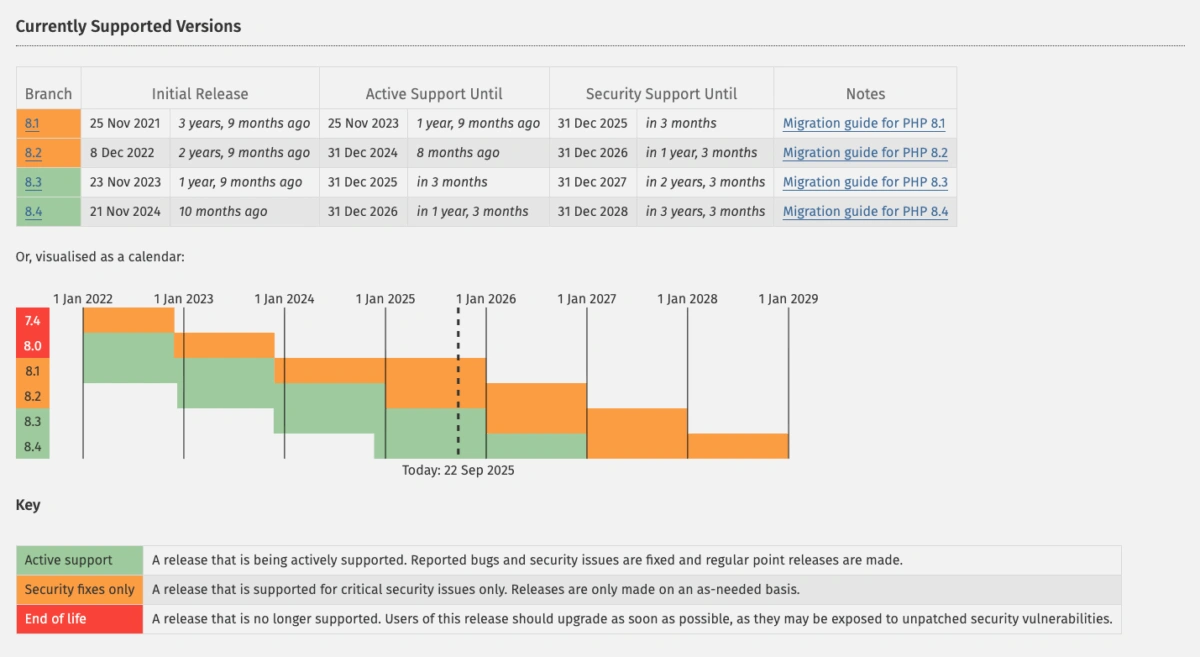
PHP is the scripting language used to code your website (and WordPress). Every so often a new version of PHP is released; multiple versions are often available at the same time, but sometimes old versions are retired. As you can see from the graph below, there are usually three versions available at any one time, one of which will have stopped receiving live updates and will just be supported with security patches. Check out where we are in the lifecycle of current PHP versions.
Why would you upgrade your PHP before you are forced to?
It is important to use a version that is still supported for the following reasons:
- Security – as PHP versions are retired, they are no longer patched for security vulnerabilities.
- Performance – with each new version, performance improvements are included, which, in turn, means a better user experience.
- Support – many plugins will not continue to support older versions of PHP as the workload to do so is untenable.
- New features for developers – these, in turn, result in greater development efficiencies and, ultimately, a better user experience.
What happens if you don’t upgrade your version of PHP before it is retired?
If a website hasn’t been proactively updated to a more recent version of PHP, when the version it uses expires or reaches ‘end of life’ for security support (patches to address security issues), a few months later, some hosting service providers (like Kinsta) will force an upgrade. Depending on the magnitude of the update, the impact of the update will vary. Some upgrades will have minimal negative effects, but others may break the site, so it is always recommended that you test the impact of an upgrade on a staging site before you make the switch.
Is it possible to use a version of PHP that has reached the end of its supported life?
In theory, it is possible to find a hosting service provider that will support an ‘expired’ version of PHP, but it is unlikely to be in your website’s best interests for the reasons outlined above.
What needs to be done right now?
Our hosting partners Kinsta will automatically upgrade any site still using PHP8.1 at some point after 31st December 2025 – they will confirm when a date is set. We recommend updating your website in advance of this date to ensure your website is as secure as possible and to prevent any downtime caused by the forced update. If you are unsure what version of PHP your site uses, you can check on the WordPress dashboard: WordPress > Tools > Site health > Server > PHP version
What happens if we don’t do the testing?
Our hosting partners will upgrade your site, and then if anything breaks, we can fix it after the fact.
Next steps
Email [email protected] if you would like any help with upgrading your version of PHP.