
For chambers, law firms and other legal organisations, forms are a crucial part of day-to-day operations. They’re used for everything from general contact requests and event registration to recruitment enquiries and applications (including pupillage and mini-pupillage for barristers’ chambers).
In the past many legal organisations have published downloadable PDF forms on their websites. They’re familiar, easy to upload, and can look “official”. But they also create friction for applicants and generate extra work for administrators, often while raising avoidable security and compliance risks. Or other websites simply ask applicants to email in their information, without applying a structure to the process and collecting answers in the same place.
Online forms offer a faster, safer, more accessible way to collect information, and they significantly improve how legal organisations manage submissions behind the scenes. And when those online forms are built with a robust platform like our form builder of choice, Gravity Forms, the benefits go even further, especially when paired with the Gravity Perks suite of add-ons or Gravity Flow for advanced workflows.
Enquiry & general forms
Enquiry forms may be basic in scope, but on legal sector websites they are among the most important. They’re the front door for solicitors, professional clients, event enquiries, media requests, and members of the public seeking legal support.
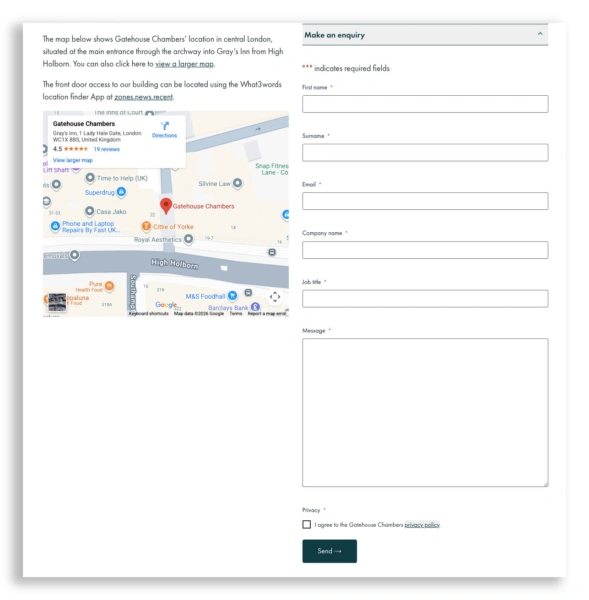
Example can be seen on Gatehouse Chambers’ website.
You can invite enquiries by email instead, but online enquiry forms have many advantages. They can collect the information you need from each person, by using mandatory fields. They can check data like email and phone numbers are in the correct format. Entries can be routed to the right person at your end depending on selections made on the form, or added straight to your CRM or to an online spreadsheet. Users can be invited to join your mailing list at the same time as submitting an enquiry. AI can be used as front-line support, to answer simple queries without troubling you. And much, much more.
We help clients create contact forms that:
- send enquiries to the right recipient automatically, using conditional routing (for example, clerking vs marketing vs pupillage)
- reduce spam and low-quality enquiries, using built-in protections and validation
- capture consent clearly, including opt-ins for storing details or replying via email/phone
- log submissions in one secure place, creating a safer audit trail than forwarding emails around teams
- protect sensitive information, by limiting what can be entered, restricting uploads, and reducing accidental disclosures
- support direct public access screening, by asking triage questions upfront before an enquiry reaches the clerking team
For busy teams, a well-designed contact form reduces admin time, improves response times and ensures enquiries don’t get lost in individual inboxes.
The problem with downloadable PDFs
PDFs may feel like a good option, but in reality, they introduce a range of issues for both users and administrators.
They create unnecessary friction for applicants
PDF forms often require users to:
- use a desktop machine not a mobile device
- download a file
- open it in a specific app
- hope it’s fillable
- save it correctly
- attach it to an email or upload it elsewhere
That’s a lot of steps to get right before you’ve even received the information, meaning more drop-offs, incomplete applications and frustrated candidates (especially on mobile).
They’re a data-handling risk waiting to happen
Once a PDF is downloaded, it can be:
- stored on personal devices
- shared accidentally
- edited improperly
- uploaded without encryption
- sent via email (which is often insecure)
Legal organisations deal with sensitive personal data routinely. PDFs make it harder to control where information goes and how long it stays there.
PDFs aren’t built for moderation workflows
If you need to:
- review applications internally
- share moderation duties between multiple people
- remove sensitive content
- share only certain sections
- anonymise data
- prevent conflicts of interest
…PDFs become a manual admin burden quickly.
Accessibility can be inconsistent
Even well-designed PDFs may not perform well for screen readers, keyboard navigation, or mobile users. In contrast, online forms can be built accessibly by default and tested more easily.
Common form usage
Here are typical forms where online form workflows consistently outperform PDFs:
- Contact forms
Cleaner routing to the right person, reduced spam, and improved reporting. - Mailing list sign-up forms
Collect information and topic preferences from your new subscribers, and add them seamlessly to your mailing list platform or CRM. - Events registration forms
Capacity management, automated confirmations and smoother online/hybrid administration. - Recruitment forms
Simplified CV submission, consistency across applicants, easier internal routing, structure moderation and email workflows. - Equality and diversity monitoring forms
Secure separation, restricted visibility, and safer handling of special category data.
Chambers-specific
- Pupillage application forms
Better structured data, file upload controls, moderation workflows and reduced admin time. - Mini-pupillage application forms
High-volume handling, fairer entry controls, fewer duplicates and smoother review. - Direct public access enquiry forms
Better triage questions, safer submission handling, clearer consent and disclaimers.
Why online forms are better
Online forms don’t just look more modern; they allow you to collect, manage and protect data in a way that aligns with the expectations of a professional legal organisation.
Better user experience & completion rates
Online forms:
- work smoothly on mobile
- guide users step-by-step
- reduce missing fields with validation
- can save and resume progress
- confirm submission instantly
This is particularly important for long, high-stakes forms like recruitment or pupillage applications, where users invest significant time completing them.
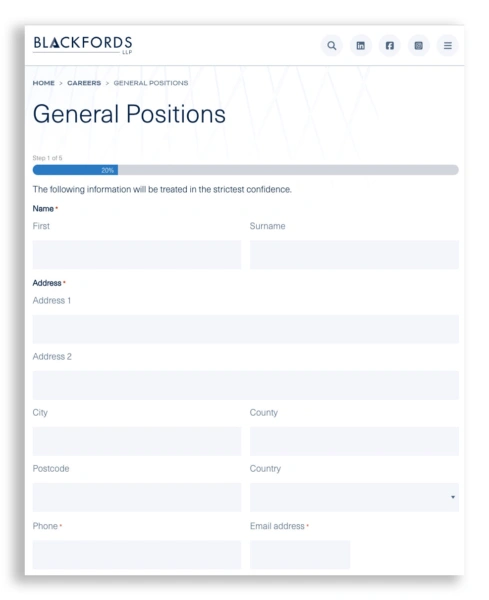
Example can be seen on Blackfords LLP website.
Stronger control over data collection
With online forms, chambers can:
- request only the information they genuinely need
- show/hide fields based on eligibility answers
- make fields required (and prevent missed sections)
- enforce file type limits for uploads
- use AI to auto-check answers and flag issues
This creates more consistent submissions and less back-and-forth.
Security and GDPR compliance improvements
Online forms can be designed to support GDPR best practice by:
- collecting only necessary personal data (data minimisation)
- capturing clear consent (with time-stamped records)
- storing submissions securely rather than passing them through email chains
- restricting who can view data internally
- reducing risk of accidental data exposure
- auto-deleting entries after a set period of time
This is especially critical for chambers where form submissions may include special category data (for example, equality & diversity information).
Workflow-based moderation also improves compliance. Access to submissions can be restricted by role, sensitive data can be hidden at specific stages, and decisions are recorded without copying data into external documents or email threads.
Anonymising form entries
Legal sector forms often contain information that should not be visible to everyone involved in the process. For example, your application committee may not want to see the names and universities of applicants.
Online forms can separate this cleanly.
- Separate forms can be joined together in a workflow, e.g. a main application form and an equality & diversity one.
- Different copies of the application can be generated and sent to different people, some with identifying details and one without.
- Specific data can be easily redacted using online controls.
With PDF workflows, this tends to mean manual redaction and version control risk. With online forms, it can be designed into the process.
Reduced admin time and smoother moderation
Instead of downloading attachments and renaming files, and managing hundreds of emails in an Inbox, online submissions can be managed in one place, reviewed, filtered, exported, and moderated quickly.
That’s a major win for busy teams.
Moderation workflows and internal decision-making
For many legal sector forms, collecting submissions is only the first step. The real complexity lies in what happens next: internal review, moderation, shortlisting, decisions, and communication with applicants.
This is where workflow automation becomes essential. Rather than relying on spreadsheets, email chains or shared folders, submissions can move through a structured, auditable moderation process.
Using Gravity Flow alongside Gravity Forms, moderators and administrators can log in to a secure dashboard and:
- review submissions centrally, without downloading files
- add internal comments and notes visible only to the review panel
- grade or score applications against defined criteria
- move entries through stages (for example: received, under review, shortlisted, rejected)
- assign submissions to specific reviewers or committees
- organise entries into folders or queues for easier shortlisting
Each action is logged, creating a clear audit trail that is far more robust than email-based decision-making.
Complex forms & workflows
Gravity Forms is one of the most trusted WordPress form builders because it’s powerful, stable and highly configurable. It is widely used across professional sectors because it allows organisations to build forms that go far beyond “name / email / message”. It is an integral part of our tech stack and is included in every website we design and build.
Advantages include:
Structured data collection
Gravity Forms produces clean, consistent entries, making it easier to:
- search applications
- export for shortlisting
- check eligibility and completeness
- report on submissions
Conditional logic for smarter forms
Legal forms often need branching logic, for example:
- “Are you eligible to work in the UK?”
- “Do you require reasonable adjustments?”
- “Are you applying for pupillage or mini-pupillage?”
- “Is your enquiry suitable for direct public access?”
Gravity Forms allows forms to adapt based on user responses. Applicants only see what’s relevant, and you reduce confusion and incomplete submissions.
Integrations
With Gravity Forms we can feed data straight into CRMs like HubSpot, Salesforce, PipeDrive etc, mailing list platforms like Mailchimp or Constant Contact, or Google Sheets for an easy, live overview of entries. Automation tools like Zapier or Make allow integration with thousands of other business tools.
Payments
Using online forms it’s easy to integrate with Stripe or PayPal to take online payments for services or event tickets, removing another part of your administrative burden.
File uploads
For event registration, recruitment and pupillage applications, file uploads are often necessary (identification, supporting documents, CVs, covering letters, references).
Gravity Forms gives you:
- upload fields with validation
- file-type restrictions
- cleaner storage and linking
- reduced reliance on email attachments
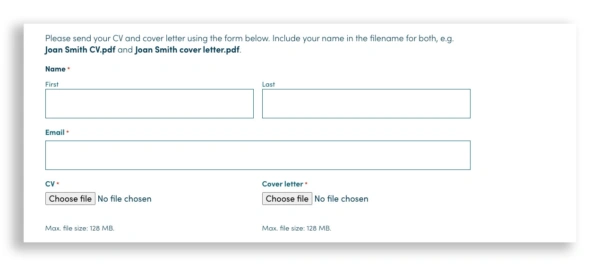
Example can be seen on Gough Square Chambers website.
Entry management in the dashboard
Form submissions are stored inside WordPress (and can also be integrated with other platforms e.g.Google Sheets) and notifications of submissions can be sent via email, allowing administrative teams to:
- view entries in one place
- set up workflows for review
- forward submissions internally without downloading attachments
- keep a consistent audit trail
When combined with workflow tools, the dashboard becomes more than a storage area. It becomes an active moderation workspace, allowing teams to manage high volumes of submissions collaboratively, without losing visibility or control.
Automated moderation with Gravity Flow
Gravity Flow extends Gravity Forms into a full workflow and moderation system, designed for organisations that need to make structured decisions on submissions.
Typical use cases in chambers and law firms include:
- recruitment and pupillage shortlisting
- mini-pupillage review panels
- event applications with approval stages
- internal approval or sign-off processes
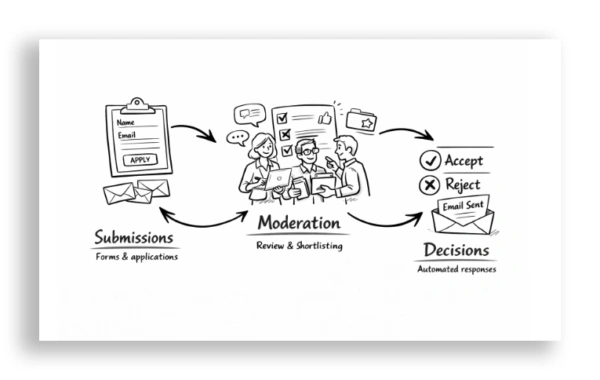
With Gravity Flow, each submission can automatically move through predefined steps. For example:
- an application is submitted
- moderators are notified and assigned
- reviewers add comments and scores
- a decision is recorded
- automated emails are sent to applicants based on the outcome
This removes the need for manual chasing, reduces human error, and ensures that applicants receive timely and consistent communication.
Advanced form features
Gravity Forms is powerful on its own. But the real game-changer for complex legal workflows is pairing it with Gravity Perks add-ons. These extensions are designed to enhance user experience, control and data integrity.
Below are the key benefits Gravity Perks can bring to a law firm or chambers website, with a focus on real-world legal use cases.
Save & Continue for longer forms
Long applications are common in chambers environments—especially pupillage and recruitment forms.
Gravity Perks can support a smoother completion process by enabling:
- saving progress mid-way
- completing forms over multiple sessions
- reducing the chance of applicants abandoning the process
This is ideal for:
- recruitment applications
- detailed direct public access screening forms
- pupillage application forms
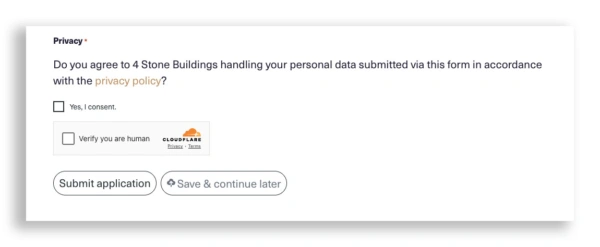
Example can be seen on 4 Stone Building’s website.
Conditional logic
Legal organisations often need forms that collect sensitive information but restrict who sees it later.
With the right Gravity Forms + Gravity Perks setup, you can:
- show or hide entire sections based on responses
- control which parts are required
- isolate sensitive sections into distinct workflows
This enables practical outcomes such as:
- keeping equality & diversity data separate from assessors
- hiding identifying details during first-stage review
- preventing unnecessary personal data collection
Review before submission
For higher-stakes legal forms, it’s helpful to reduce errors and ensure applicants understand what they’re submitting.
Gravity Perks features can be used to:
- give users a clear review page
- reduce mistaken entries
- confirm declarations before submit
This is especially useful for:
- pupillage and mini-pupillage submissions
- event registrations (particularly limited spaces)
- direct public access enquiries
Limits, deadlines & validation
Some forms get a surge of applications when they go live. Gravity Perks can help impose:
- entry limits
- controlled opening and closing
- restrictions based on criteria
- better handling of peak traffic
This supports scenarios like:
- “Applications open at 9am and close after 200 entries”
- “Only allow one submission per person”
- “Prevent duplicate applications”
Smarter event registration
Events are becoming more complex: webinars, hybrid open evenings, CPD events, talks, and chambers-hosted recruitment events.
Online event booking forms allow chambers to handle:
- attendee types (online vs in-person)
- capacity limits
- dietary or access requirements
- confirmation emails and reminders
- collecting questions in advance
This improves the experience for attendees and makes events far easier to manage.
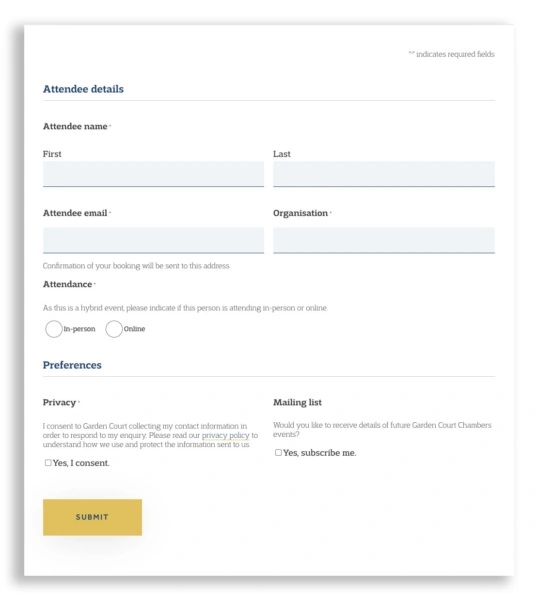
Example can be seen on Garden Court Chamber’s website.
Summary
For legal sector websites, moving away from downloadable PDFs is about much more than convenience. It’s about improving security, reducing GDPR exposure, protecting sensitive applicant data, supporting fairer recruitment processes, saving admin time, and delivering a smoother user experience.
With Gravity Forms, you gain a reliable and scalable platform for collecting submissions. With Gravity Perks, you enhance usability and data control. And with Gravity Flow, you unlock structured moderation, shortlisting and decision-making workflows – all within a secure, auditable system designed for professional teams.
If you would like help designing or improving form workflows on your website – from simple enquiries to complex moderation processes – email us at [email protected]. Or if you’re a barristers’ chambers but not a client of Square Eye’s, check out our standalone form & workflow offering, BarForms.